Turborepo: Fast Monorepo Builds for TypeScript Projects
Monorepos are excellent for sharing code across multiple packages and apps, but they have an inherent problem: as they grow, builds get slow. Run tests on a change to a utility package, and you might trigger rebuilds of 15 apps that depend on it — most of which haven't changed.
Turborepo solves this with content-aware caching and parallel task execution. It only runs tasks that need to run, caches outputs locally and remotely, and can parallelize independent tasks across your available CPU cores.
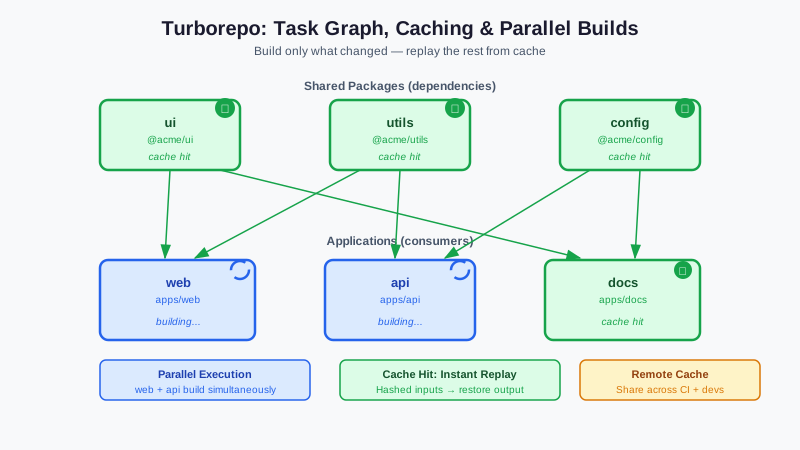
What Turborepo Does
Given a monorepo with packages ui, utils, api, and web:
- If you change
utils, Turborepo rebuildsutilsand anything that depends on it - If nothing changed since the last build, Turborepo replays cached outputs instantly
- Independent tasks (like testing
apiand testingweb) run in parallel - With remote caching, CI gets the same cache benefits as local development
The result: builds that take 10 minutes can drop to 30 seconds — even on CI where nothing is cached locally.
Monorepo Structure
Turborepo works with npm, Yarn, pnpm, and Bun workspaces. Example structure:
my-monorepo/
├── apps/
│   ├── web/           # Next.js frontend
│   └── api/           # Express/Hono API
├── packages/
│   ├── ui/            # Shared React components
│   ├── utils/         # Shared utilities
│   └── config/        # Shared configs (ESLint, TypeScript, etc.)
├── package.json       # Root workspace config
└── turbo.json         # Turborepo configuration
Installation
In a new project
npx create-turbo@latest
# Or with Bun
bunx create-turbo@latest
In an existing monorepo
# npm/Yarn/pnpm
npm install turbo --save-dev -W

# Bun
bun add -d turbo
Configuration: turbo.json
The core Turborepo config defines tasks, their dependencies, and caching behavior.
Basic configuration
{
  "$schema": "https://turbo.build/schema.json",
  "tasks": {
    "build": {
      "dependsOn": ["^build"],
      "outputs": [".next/**", "dist/**"]
    },
    "test": {
      "outputs": ["coverage/**"]
    },
    "lint": {},
    "dev": {
      "persistent": true,
      "cache": false
    }
  }
}
Key concepts
dependsOn: Specifies what must run before this task.
"^build"means "runbuildin all dependencies first" (topological ordering)"build"(without^) means "runbuildin the same package first"[]means the task has no dependencies
outputs: Files to cache when this task completes. On cache hit, these files are restored without re-running the task.
cache: Set to false for tasks that should always run (like dev servers).
persistent: Long-running tasks that shouldn't be treated as completed (watchers, dev servers).
Advanced configuration
{
  "$schema": "https://turbo.build/schema.json",
  "tasks": {
    "build": {
      "dependsOn": ["^build"],
      "outputs": [".next/**", "dist/**", "!dist/**/*.map"],
      "env": ["NODE_ENV", "API_URL"],
      "inputs": ["src/**/*.ts", "src/**/*.tsx", "package.json"]
    },
    "test": {
      "dependsOn": ["^build"],
      "outputs": ["coverage/**"],
      "inputs": ["src/**/*.ts", "**/__tests__/**", "jest.config.*"]
    },
    "typecheck": {
      "dependsOn": ["^build"]
    },
    "lint": {
      "dependsOn": []
    },
    "db:generate": {
      "cache": false
    }
  }
}
env: Environment variables that affect the cache key — if API_URL changes, the build runs again.
inputs: Limit which files affect the cache key. By default, all files in the package directory are considered.
Running Tasks
# Run build in all packages
turbo run build
# Or with Bun
bunx turbo build

# Run multiple tasks
turbo run lint test build

# Run in specific packages only
turbo run build --filter=web
turbo run test --filter=./apps/*  # All apps
turbo run build --filter=...web   # web and everything it depends on

# Force re-run ignoring cache
turbo run build --force

# Dry run (show what would run)
turbo run build --dry-run
Filter syntax
| Filter | Matches |
--filter=web | Package named "web" |
--filter=./apps/* | All packages in apps/ |
--filter=...web | web + all its dependents |
--filter=web... | web + all its dependencies |
--filter=[HEAD^1] | Packages changed since last commit |
--filter=[main...HEAD] | Packages changed since main branch |
The [HEAD^1] filter is powerful for CI: only run tests for packages that actually changed in the PR.
Package Dependencies
For Turborepo to understand the task graph, packages must declare their workspace dependencies:
// apps/web/package.json
{
  "name": "web",
  "dependencies": {
    "@myrepo/ui": "*",
    "@myrepo/utils": "*"
  }
}
// packages/ui/package.json
{
  "name": "@myrepo/ui",
  "main": "./dist/index.js",
  "scripts": {
    "build": "tsup src/index.ts --format esm,cjs"
  }
}
Turborepo reads these dependencies to build the task graph and determine execution order.
Remote Caching
Local caching helps on developer machines. Remote caching shares the cache across all machines — CI, other developers, staging environments.
Vercel Remote Cache (official, free)
# Link to Vercel (one-time setup)
turbo login
turbo link

# CI: set TURBO_TOKEN and TURBO_TEAM environment variables
In GitHub Actions:
- name: Build
  run: turbo run build
  env:
    TURBO_TOKEN: ${{ secrets.TURBO_TOKEN }}
    TURBO_TEAM: ${{ vars.TURBO_TEAM }}
Self-hosted remote cache (Ducktape/Turborepo Remote Cache)
For fully self-hosted remote caching, use the open-source ducktape or turborepo-remote-cache project:
# Deploy ducktape
docker run -p 3000:3000 \
  -e STORAGE_PROVIDER=local \
  -e STORAGE_PATH=/data \
  fox1t/turborepo-remote-cache
Configure Turborepo to use it:
// turbo.json
{
  "remoteCache": {
    "apiUrl": "https://turbo-cache.yourdomain.com"
  }
}
CI/CD Integration
GitHub Actions
name: CI

on:
  push:
    branches: [main]
  pull_request:

jobs:
  build:
    runs-on: ubuntu-latest
    steps:
      - uses: actions/checkout@v4
        with:
          fetch-depth: 2  # For HEAD^1 filtering

      - uses: oven-sh/setup-bun@v2

      - name: Install dependencies
        run: bun install --frozen-lockfile

      - name: Build changed packages
        run: bunx turbo run build --filter=[HEAD^1]
        env:
          TURBO_TOKEN: ${{ secrets.TURBO_TOKEN }}
          TURBO_TEAM: ${{ vars.TURBO_TEAM }}

      - name: Test changed packages
        run: bunx turbo run test --filter=[HEAD^1]
        env:
          TURBO_TOKEN: ${{ secrets.TURBO_TOKEN }}
          TURBO_TEAM: ${{ vars.TURBO_TEAM }}
Parallel jobs for large monorepos
For very large repos, split tasks across parallel CI runners:
strategy:
  matrix:
    task: [lint, typecheck, test]
steps:
  - run: bunx turbo run ${{ matrix.task }}
Turborepo vs. Nx
| Turborepo | Nx | |
| Configuration | Simple JSON | More complex |
| Generator/scaffolding | None | Built-in |
| Caching | Excellent | Excellent |
| Remote cache | Vercel (free) or self-hosted | Nx Cloud (paid) or self-hosted |
| Affected detection | Git-based | Git-based + static analysis |
| Language support | Any | Any |
| Learning curve | Low | Higher |
| Plugin ecosystem | Minimal | Extensive |
Turborepo is simpler to set up and configure. Nx has more features for large organizations (code generators, project graph visualization, enforced architecture boundaries). For most TypeScript projects, Turborepo is the right choice.
Migrating an Existing Monorepo
- Install Turborepo:
npm install turbo -D -W - Create
turbo.jsonwith your task definitions - Identify shared outputs (
dist/,.next/,build/) - Run
turbo run buildand verify behavior - Enable remote caching
- Update CI to use
--filter=[HEAD^1]
The migration is incremental — Turborepo wraps your existing npm scripts, so you don't need to change the scripts themselves.
More TypeScript tooling guides at DevTools Guide newsletter.